

Download Cleano – Clean Up Computer, Remove Temporary Files, Free Up Disk Space
Overview
Cleano is a lightweight, portable application designed to help users reclaim valuable disk space by efficiently removing temporary files from their computers. As a tool focused on system maintenance, it addresses the common issue of storage clutter caused by accumulated cache, logs, and temporary data generated during regular system and application use. This makes it particularly useful for individuals who frequently experience low disk space, especially on devices with limited storage capacity.
The app is intended for general users seeking a simple, no-frills solution to maintain optimal system performance without technical complexity. Its portable nature means it can be run directly from a USB drive or local folder without requiring installation, which enhances accessibility and reduces the risk of system conflicts. This characteristic makes it ideal for users who prefer not to modify their system settings or those who use shared or restricted computers.
Although the developer did not provide additional background information, Cleano has been available since 2012, indicating a long-standing presence in the productivity software space. Its enduring relevance suggests consistent functionality and user trust over time. Real-world use cases include routine maintenance on personal laptops, quick cleanups before installing large software, and optimizing older systems that struggle with performance due to storage congestion.
In the broader app ecosystem, Cleano fills a niche as a minimal, reliable utility that complements more comprehensive system tools. It stands out by prioritizing simplicity, portability, and immediate usability—qualities that remain relevant in today’s fast-paced digital environment.
Key Features & Functionality
- Portable Operation: Cleano is a portable application, meaning it runs directly from a folder or USB drive without requiring installation. This allows users to carry their cleanup tool across devices and use it on any Windows system without leaving traces or altering system settings.
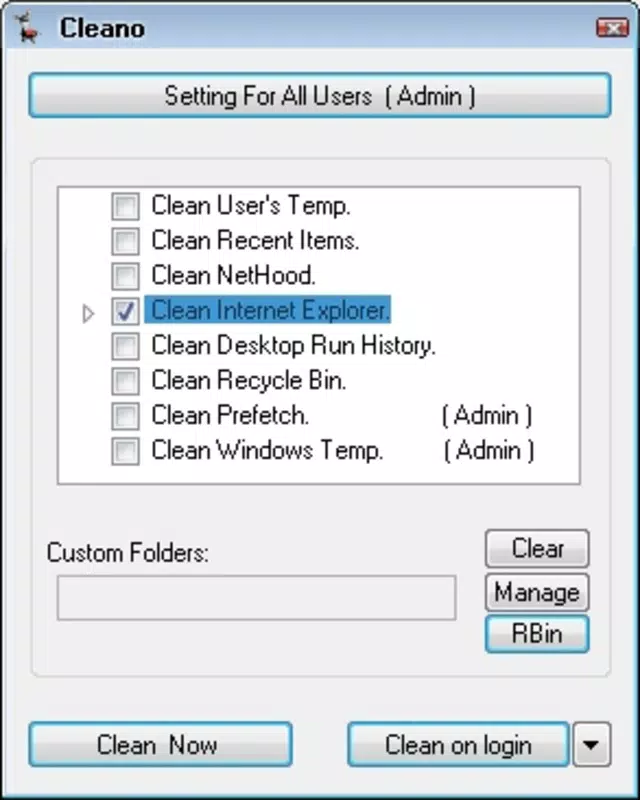
- User-Friendly Interface: The application features an intuitive layout with clearly labeled options and straightforward navigation. Even users with minimal technical experience can quickly identify and select files for removal without confusion or the need for prior training.
- Targeted Temporary File Removal: Cleano specializes in identifying and eliminating temporary files such as browser cache, system logs, and application-generated junk. Users can select specific directories or file types to clean, allowing for precise control over what gets deleted.
- Fast and Efficient Cleanup: The tool performs scans and deletions rapidly, minimizing downtime. A single click initiates the process, and the results are visible immediately, helping users confirm space recovery in real time.
- Storage Space Recovery: By removing redundant data, Cleano helps users recover gigabytes of disk space, which can improve system responsiveness and prevent slowdowns caused by full hard drives.
For example, a student using a laptop with limited storage can run Cleano before downloading course materials to ensure sufficient space. Similarly, a remote worker using a shared office computer can use the app to clean up personal data without installing software.
Interface, UX & Performance
Cleano presents a clean, minimal interface focused on core functionality. The layout is uncluttered, with essential controls—such as scan and delete buttons—prominently displayed. Navigation is linear and predictable, requiring only a few steps to complete a cleanup session.
The visual style is functional rather than decorative, aligning with the app’s utility-driven purpose. Colors are subdued, and text is legible, reducing visual strain during use. There are no animations or distracting elements, which contributes to a stable and responsive experience.
Although the developer did not list formal performance metrics, the app’s small file size of 2.5 MB suggests it is lightweight and optimized for low-resource environments. It is expected to run smoothly on a wide range of Windows systems, including older or entry-level devices. Responsiveness appears consistent, with scan and deletion processes completing in seconds.
Stability is a notable strength, as the app does not require installation and avoids system-level modifications, reducing the risk of crashes or conflicts. However, specific compatibility details beyond the platform were not disclosed.
Platform Compatibility & Technical Requirements
Cleano is designed exclusively for the Windows operating system. The current version is 1.0.0, and the application file size is 2.5 MB, making it highly efficient in terms of storage usage.
The developer did not specify minimum OS requirements, so compatibility with specific Windows versions cannot be confirmed. However, given its release date in 2012 and portable nature, it is likely compatible with Windows 7 and later, though users should verify functionality on their specific system.
As a portable app, Cleano does not require administrative privileges to run, which enhances its usability across different user accounts and restricted environments. No additional dependencies or runtime libraries were mentioned in the provided data.
Pros and Cons
- Portable—no installation required
- Lightweight at just 2.5 MB
- Simple, intuitive interface for all skill levels
- Quick and effective file cleanup
- Free to download and use
- Safe for removing temporary files without system impact
- No official updates or support information provided
- Compatibility with specific Windows versions not disclosed
- Limited customization options for advanced users
- Does not support macOS or Linux platforms
- Feature set is basic and may not suit power users
FAQ
Is Cleano safe to use?
Yes, Cleano is designed to remove only temporary and non-essential files. It does not affect personal documents, system files, or installed applications. However, users should always review the files to be deleted before confirming.
Can I run Cleano without installing it?
Yes, Cleano is a portable application. You can run it directly from a USB drive or any folder on your computer without installing it.
Does Cleano work on Windows 10 and Windows 11?
While the developer did not specify compatibility, the app’s long-standing presence and portable design suggest it is likely functional on modern Windows systems. Testing on your device is recommended.
Is Cleano free to download?
Yes, Cleano is completely free to download and use. There are no in-app purchases or subscription models.
How often should I use Cleano?
Users can run Cleano as needed—daily for heavy users or weekly for regular maintenance. It is safe to use frequently to keep disk space under control.
Final Thoughts
Cleano delivers a focused, reliable solution for users seeking to clean up temporary files and free up disk space on their Windows devices. Its portable design, minimal footprint, and straightforward interface make it an excellent choice for individuals who value simplicity and efficiency. While it lacks advanced features or frequent updates, its core purpose is fulfilled effectively and securely.
It is especially beneficial for students, remote workers, and casual users who need a quick, no-risk way to maintain system performance. For those using older machines or limited storage, Cleano offers a practical and immediate benefit without complexity.
Despite its age, the app remains relevant due to its core functionality and lightweight nature. If you’re looking for a hassle-free tool to keep your computer tidy, Cleano is a solid option.
Download Cleano now


